Climate Project

This assignment was done in collaboration with Nereid Kwok, Nisa Ozer, Thomas Giannetti-Fakhouri, and Kazmer Nagy-Betegh as a part of a homework assignment in our Applied Statistics class at London Business School taught by Kostis Christodoulou.
Climate change and temperature anomalies
If we wanted to study climate change, we can find data on the Combined Land-Surface Air and Sea-Surface Water Temperature Anomalies in the Northern Hemisphere at NASA’s Goddard Institute for Space Studies. The tabular data of temperature anomalies can be found here
To define temperature anomalies you need to have a reference, or base, period which NASA clearly states that it is the period between 1951-1980.
Run the code below to load the file:
weather <-
  read_csv("https://data.giss.nasa.gov/gistemp/tabledata_v4/NH.Ts+dSST.csv",
           skip = 1,
           na = "***")
Notice that, when using this function, we added two options: skip and na.
- The
skip=1option is there as the real data table only starts in Row 2, so we need to skip one row. na = "***"option informs R how missing observations in the spreadsheet are coded. When looking at the spreadsheet, you can see that missing data is coded as “***“. It is best to specify this here, as otherwise some of the data is not recognized as numeric data.
Once the data is loaded, notice that there is a object titled weather in the Environment panel. If you cannot see the panel (usually on the top-right), go to Tools > Global Options > Pane Layout and tick the checkbox next to Environment. Click on the weather object, and the dataframe will pop up on a seperate tab. Inspect the dataframe.
For each month and year, the dataframe shows the deviation of temperature from the normal (expected). Further the dataframe is in wide format.
You have two objectives in this section:
Select the year and the twelve month variables from the
weatherdataset. We do not need the others (J-D, D-N, DJF, etc.) for this assignment. Hint: useselect()function.Convert the dataframe from wide to ‘long’ format. Hint: use
gather()orpivot_longer()function. Name the new dataframe astidyweather, name the variable containing the name of the month asmonth, and the temperature deviation values asdelta.
weather_12m <- weather%>%
  clean_names()%>%
  select(year, jan, feb, mar, apr, may, jun, jul, aug, sep, oct, nov, dec)

tidyweather <- weather_12m%>%
  pivot_longer(cols = 2:13,
               names_to = "month",
               values_to = "delta")

head(tidyweather)
## # A tibble: 6 × 3
## year month delta
## <dbl> <chr> <dbl>
## 1 1880 jan -0.34
## 2 1880 feb -0.5
## 3 1880 mar -0.22
## 4 1880 apr -0.29
## 5 1880 may -0.05
## 6 1880 jun -0.15Inspect your dataframe. It should have three variables now, one each for
- year,
- month, and
- delta, or temperature deviation.
Plotting Information
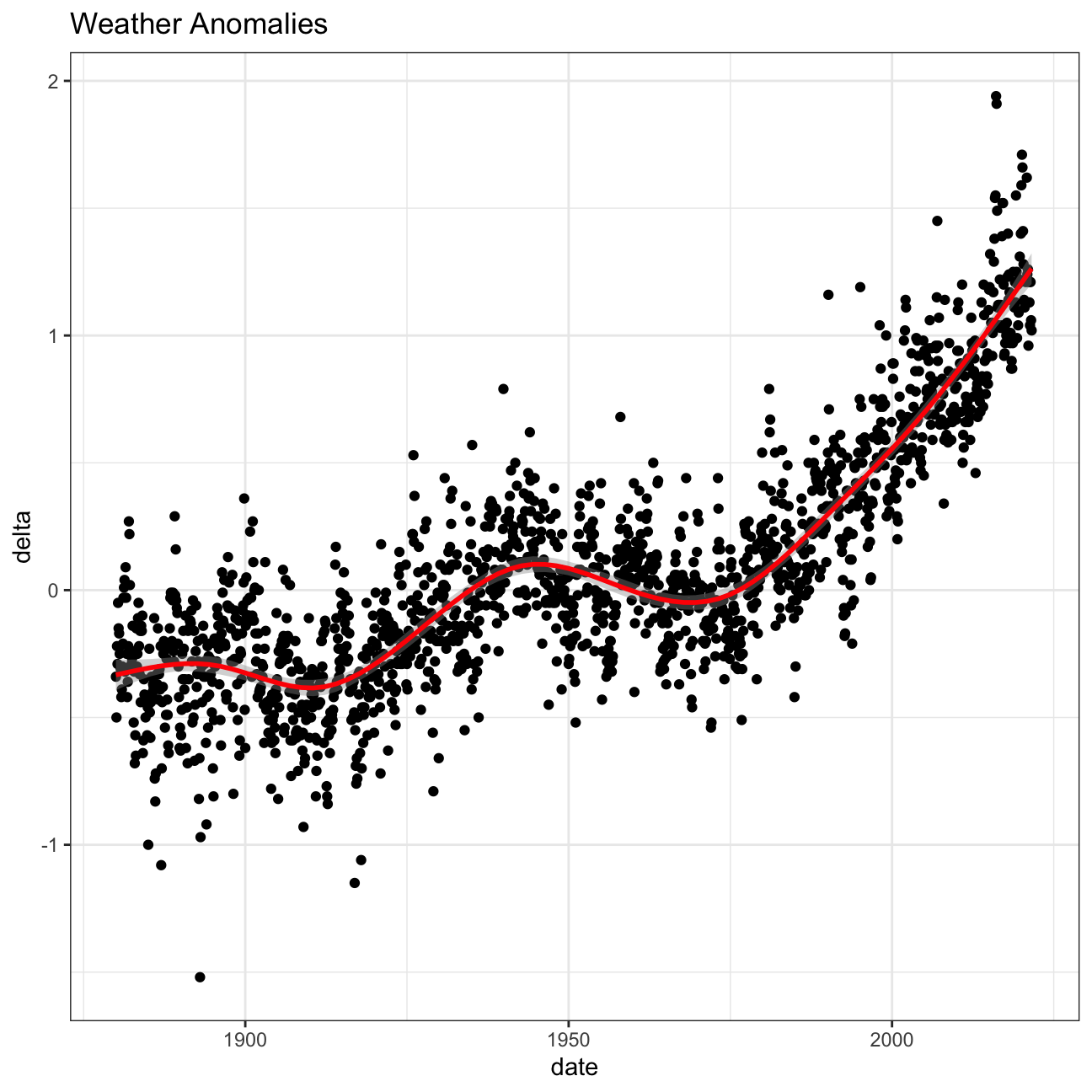
Let us plot the data using a time-series scatter plot, and add a trendline. To do that, we first need to create a new variable called date in order to ensure that the delta values are plot chronologically.
In the following chunk of code, I used the
eval=FALSEargument, which does not run a chunk of code; I did so that you can knit the document before tidying the data and creating a new dataframetidyweather. When you actually want to run this code and knit your document, you must deleteeval=FALSE, not just here but in all chunks wereeval=FALSEappears.
tidyweather <- tidyweather %>%
  mutate(date = ymd(paste(as.character(year), month, "1")),
         month = month(date, label=TRUE),
         year = year(date))

ggplot(tidyweather, aes(x=date, y = delta))+
  geom_point()+
  geom_smooth(color="red") +
  theme_bw() +
  labs (
    title = "Weather Anomalies"
  )
Is the effect of increasing temperature more pronounced in some months? Use facet_wrap() to produce a seperate scatter plot for each month, again with a smoothing line. Your chart should human-readable labels; that is, each month should be labeled “Jan”, “Feb”, “Mar” (full or abbreviated month names are fine), not 1, 2, 3.
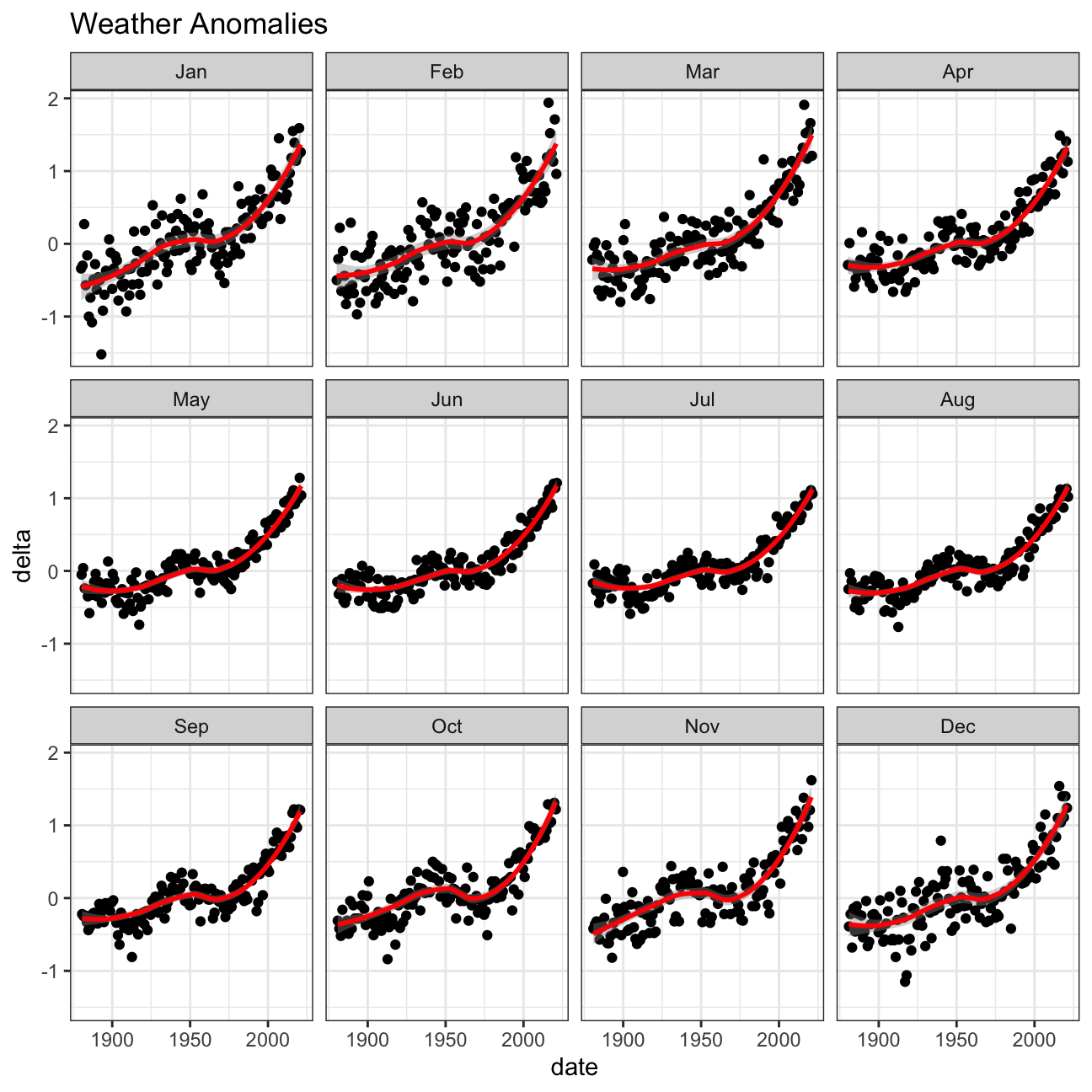 >TEAM ANSWER>
After breaking the data down into months it looks like for the most part the affect of increasing temperature is similar accross the board.
It is sometimes useful to group data into different time periods to study historical data. For example, we often refer to decades such as 1970s, 1980s, 1990s etc. to refer to a period of time. NASA calcuialtes a temperature anomaly, as difference form the base period of 1951-1980. The code below creates a new data frame called comparison that groups data in five time periods: 1881-1920, 1921-1950, 1951-1980, 1981-2010 and 2011-present.
We remove data before 1800 and before using filter. Then, we use the mutate function to create a new variable interval which contains information on which period each observation belongs to. We can assign the different periods using case_when().
comparison <- tidyweather %>%
  filter(year>= 1881) %>%     #remove years prior to 1881
  #create new variable 'interval', and assign values based on criteria below:
  mutate(interval = case_when(
    year %in% c(1881:1920) ~ "1881-1920",
    year %in% c(1921:1950) ~ "1921-1950",
    year %in% c(1951:1980) ~ "1951-1980",
    year %in% c(1981:2010) ~ "1981-2010",
    TRUE ~ "2011-present"
  ))

head(comparison)
## # A tibble: 6 × 5
## year month delta date interval
## <dbl> <ord> <dbl> <date> <chr>
## 1 1881 Jan -0.3 1881-01-01 1881-1920
## 2 1881 Feb -0.21 1881-02-01 1881-1920
## 3 1881 Mar -0.03 1881-03-01 1881-1920
## 4 1881 Apr 0.01 1881-04-01 1881-1920
## 5 1881 May 0.04 1881-05-01 1881-1920
## 6 1881 Jun -0.32 1881-06-01 1881-1920Inspect the comparison dataframe by clicking on it in the Environment pane.
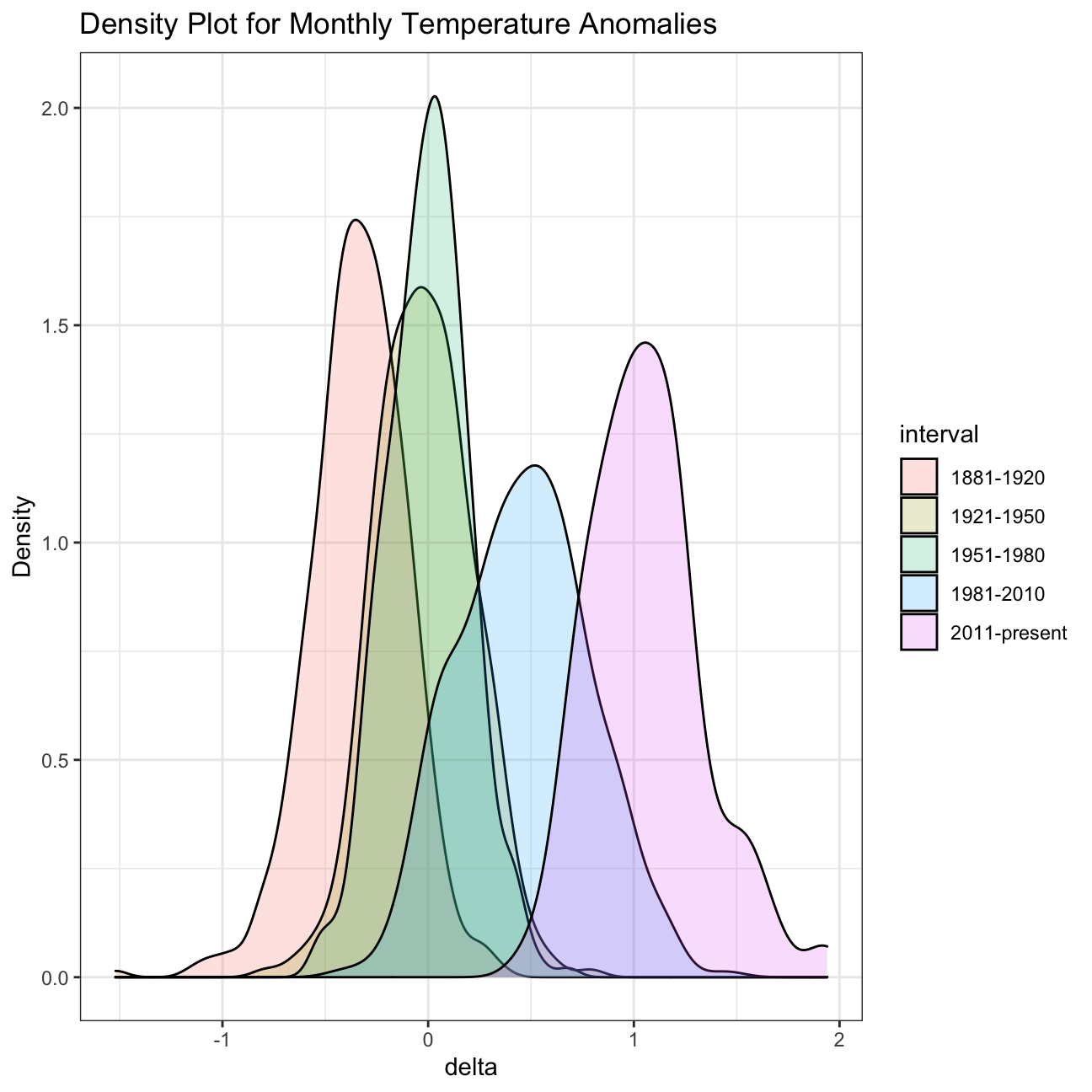
Now that we have the interval variable, we can create a density plot to study the distribution of monthly deviations (delta), grouped by the different time periods we are interested in. Set fill to interval to group and colour the data by different time periods.
ggplot(comparison, aes(x=delta, fill=interval))+
  geom_density(alpha=0.2) +   #density plot with tranparency set to 20%
  theme_bw() +                #theme
  labs (
    title = "Density Plot for Monthly Temperature Anomalies",
    y     = "Density"         #changing y-axis label to sentence case
  )
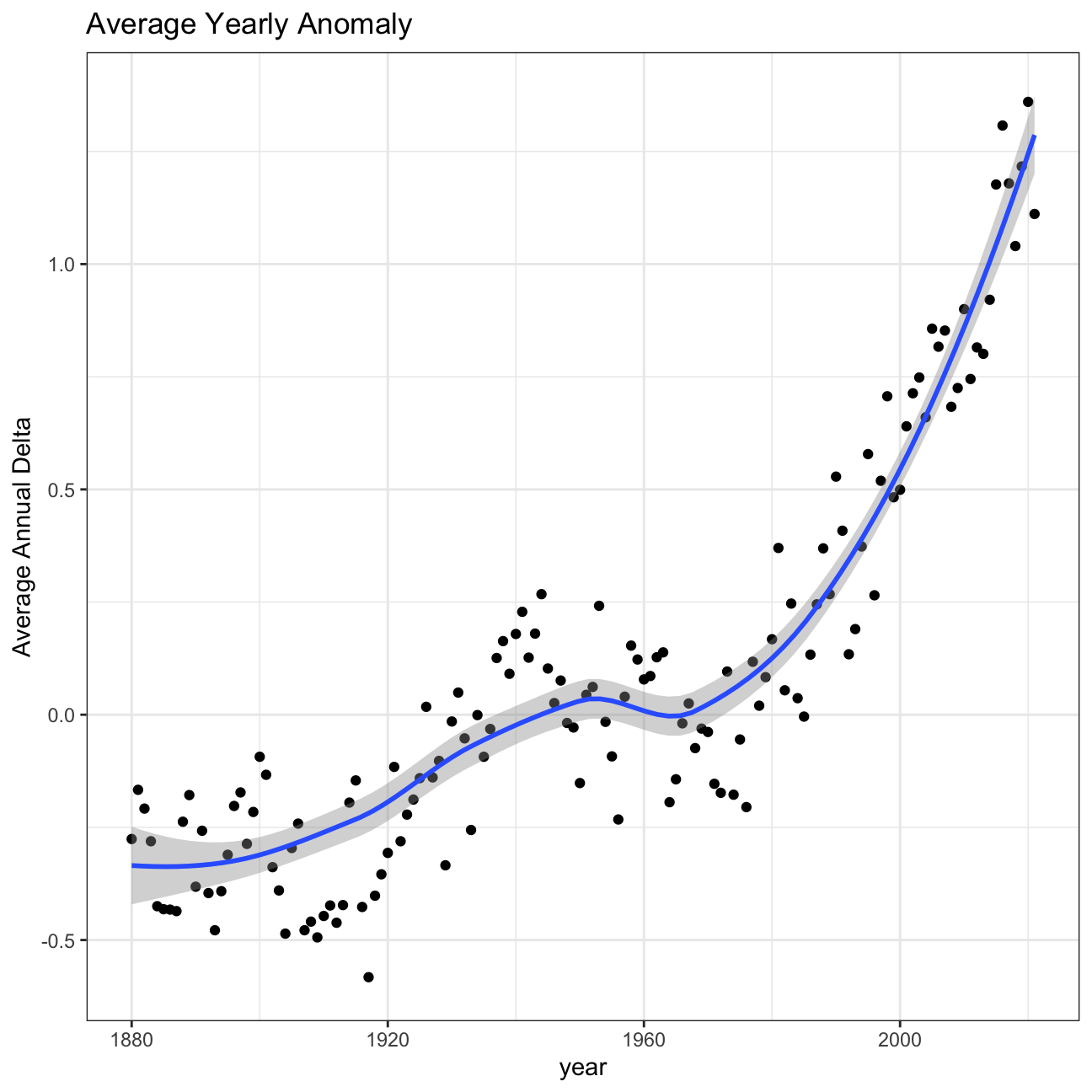
So far, we have been working with monthly anomalies. However, we might be interested in average annual anomalies. We can do this by using group_by() and summarise(), followed by a scatter plot to display the result.
#creating yearly averages
average_annual_anomaly <- tidyweather %>%
  group_by(year) %>%   #grouping data by Year

  # creating summaries for mean delta
  # use `na.rm=TRUE` to eliminate NA (not available) values
  summarise(mean_delta = mean(delta,na.rm = TRUE)
            )

#plotting the data:
ggplot(average_annual_anomaly, aes(x=year, y= mean_delta))+
  geom_point()+

  #Fit the best fit line, using LOESS method
  geom_smooth() +

  #change to theme_bw() to have white background + black frame around plot
  theme_bw() +
  labs (
    title = "Average Yearly Anomaly",
    y     = "Average Annual Delta"
) 
Confidence Interval for delta
NASA points out on their website that
A one-degree global change is significant because it takes a vast amount of heat to warm all the oceans, atmosphere, and land by that much. In the past, a one- to two-degree drop was all it took to plunge the Earth into the Little Ice Age.
Your task is to construct a confidence interval for the average annual delta since 2011, both using a formula and using a bootstrap simulation with the infer package. Recall that the dataframe comparison has already grouped temperature anomalies according to time intervals; we are only interested in what is happening between 2011-present.
formula_ci <- comparison %>%
  filter(interval == "2011-present")%>%
  group_by(interval)%>%
  summarise(mean_delta = mean(delta, na.rm=TRUE),
            sd_delta = sd(delta,na.rm=TRUE),
            count_delta = n(),
            se_delta = sd_delta/ sqrt(count_delta),
            t_critical = qt(0.975, count_delta - 1 ),
            lower = mean_delta - t_critical * se_delta,
            upper = mean_delta + t_critical * se_delta)

  # choose the interval 2011-present
  # what dplyr verb will you use?

  # calculate summary statistics for temperature deviation (delta)
  # calculate mean, SD, count, SE, lower/upper 95% CI
  # what dplyr verb will you use?

#print out formula_CI
formula_ci
## # A tibble: 1 × 8
## interval mean_delta sd_delta count_delta se_delta t_critical lower upper
## <chr> <dbl> <dbl> <int> <dbl> <dbl> <dbl> <dbl>
## 1 2011-present 1.06 0.274 132 0.0239 1.98 1.01 1.11library(infer)
library(tidyverse)
set.seed(1234)
# use the infer package to construct a 95% CI for delta
# bootstrap for MEAN rent
boot_comparison <- comparison %>%
# Select 2-bedroom flat
filter(interval == "2011-present") %>%
# Specify the variable of interest
specify(response = delta) %>%
# Generate a bunch of bootstrap samples
generate(reps = 1000, type = "bootstrap") %>%
# Find the mean of each sample
calculate(stat = "mean")
percentile_ci <- boot_comparison %>%
get_ci(level = 0.95, type = "percentile")
visualize(boot_comparison) +
shade_ci(endpoints = percentile_ci,fill = "khaki")+
geom_vline(xintercept = formula_ci$lower, colour = "red")+
geom_vline(xintercept = formula_ci$upper, colour = "red")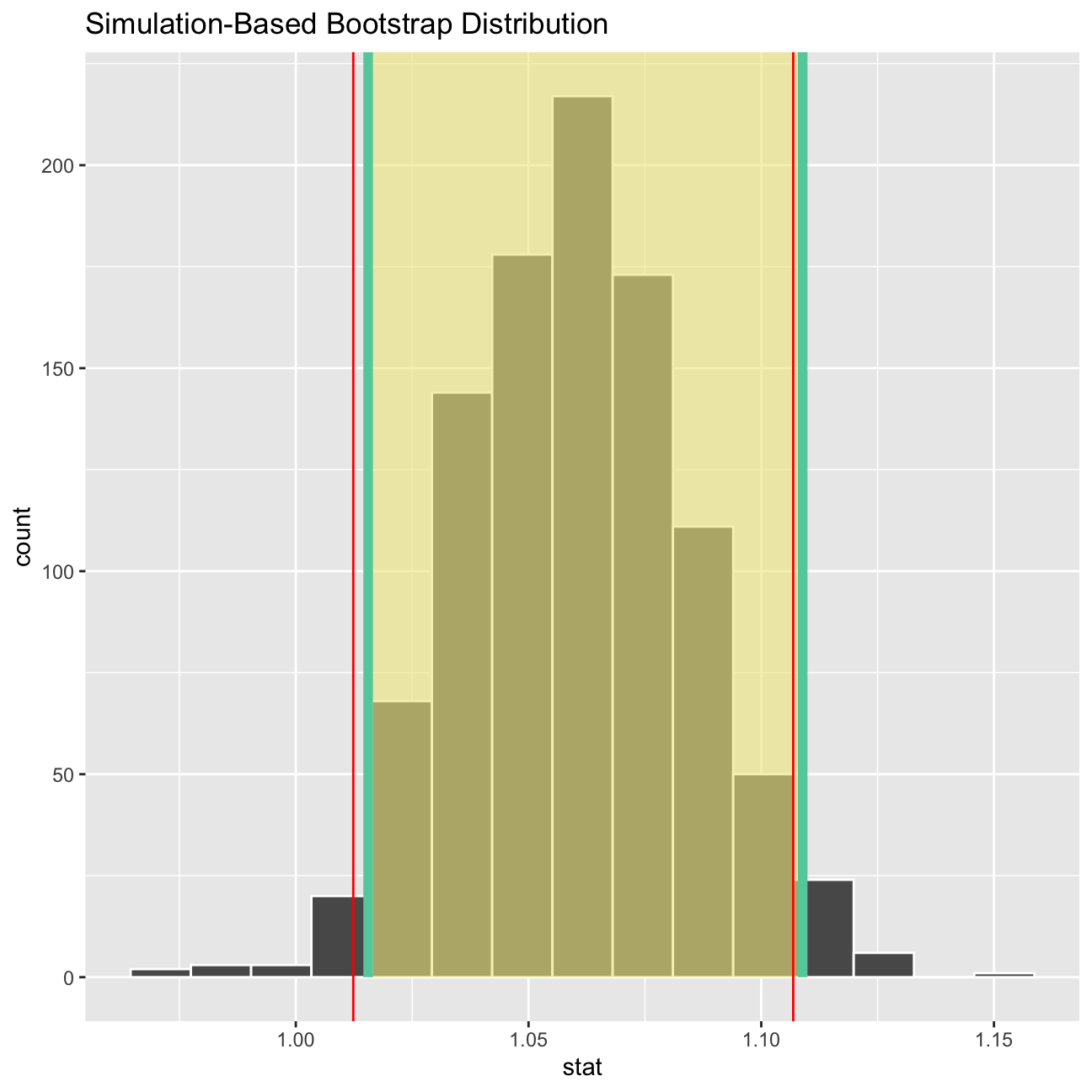
What is the data showing us? Please type your answer after (and outside!) this blockquote. You have to explain what you have done, and the interpretation of the result. One paragraph max, please!
TEAM ANSWER
To create this visual we first used boot strapping to get a random sample of deltas from our dataset. After the bootstrap sample was created we used the sample to calculate a 95% confidence interval for the mean of deltas. On the graph the green lines show our bootstrapped confidence interval and tell us that we are 95% confident that the true mean delta is between about 1.016 and 1.12, while the red line (1.013; 1.108) show the calculated confidence interval from the sample.